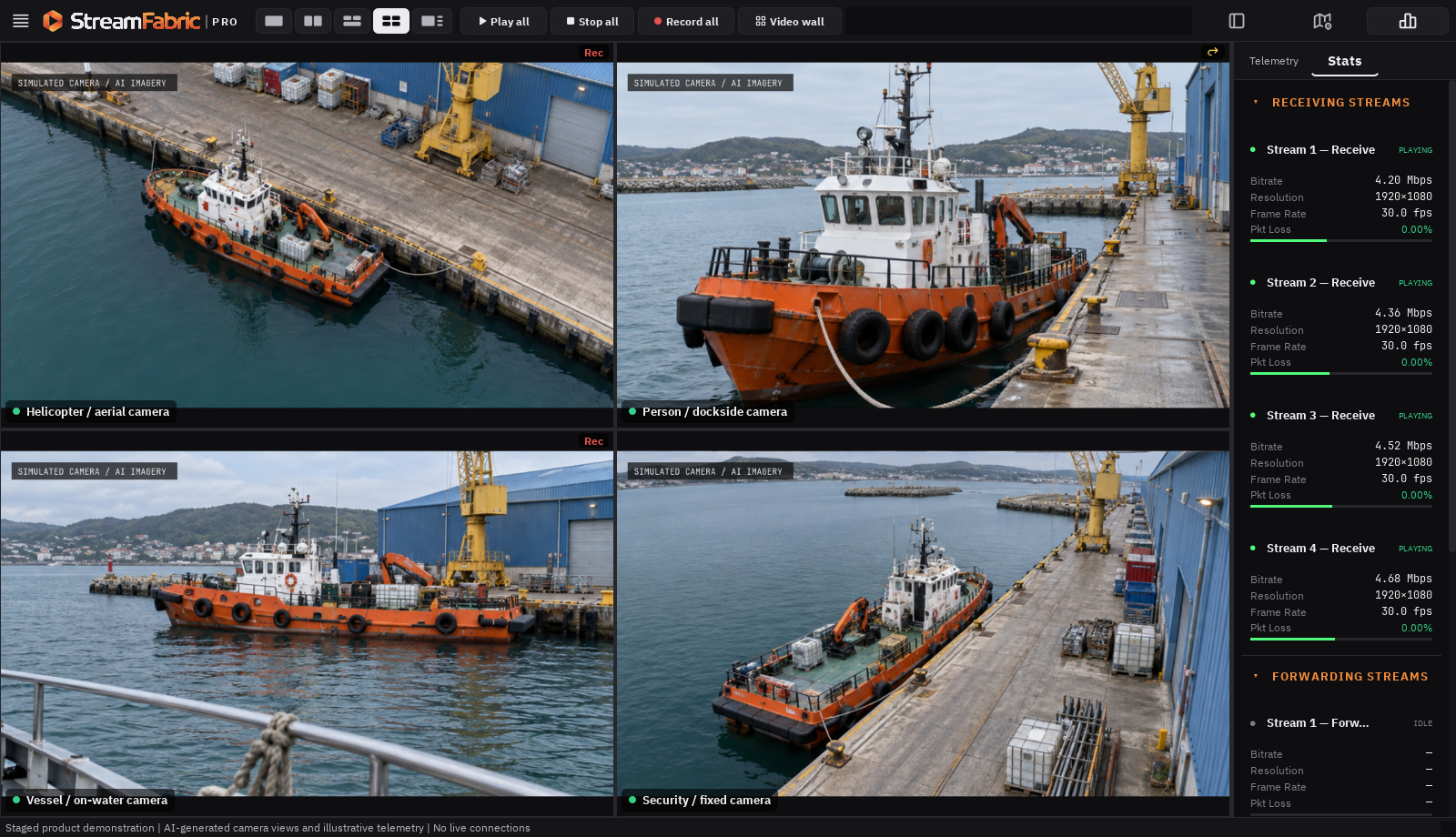
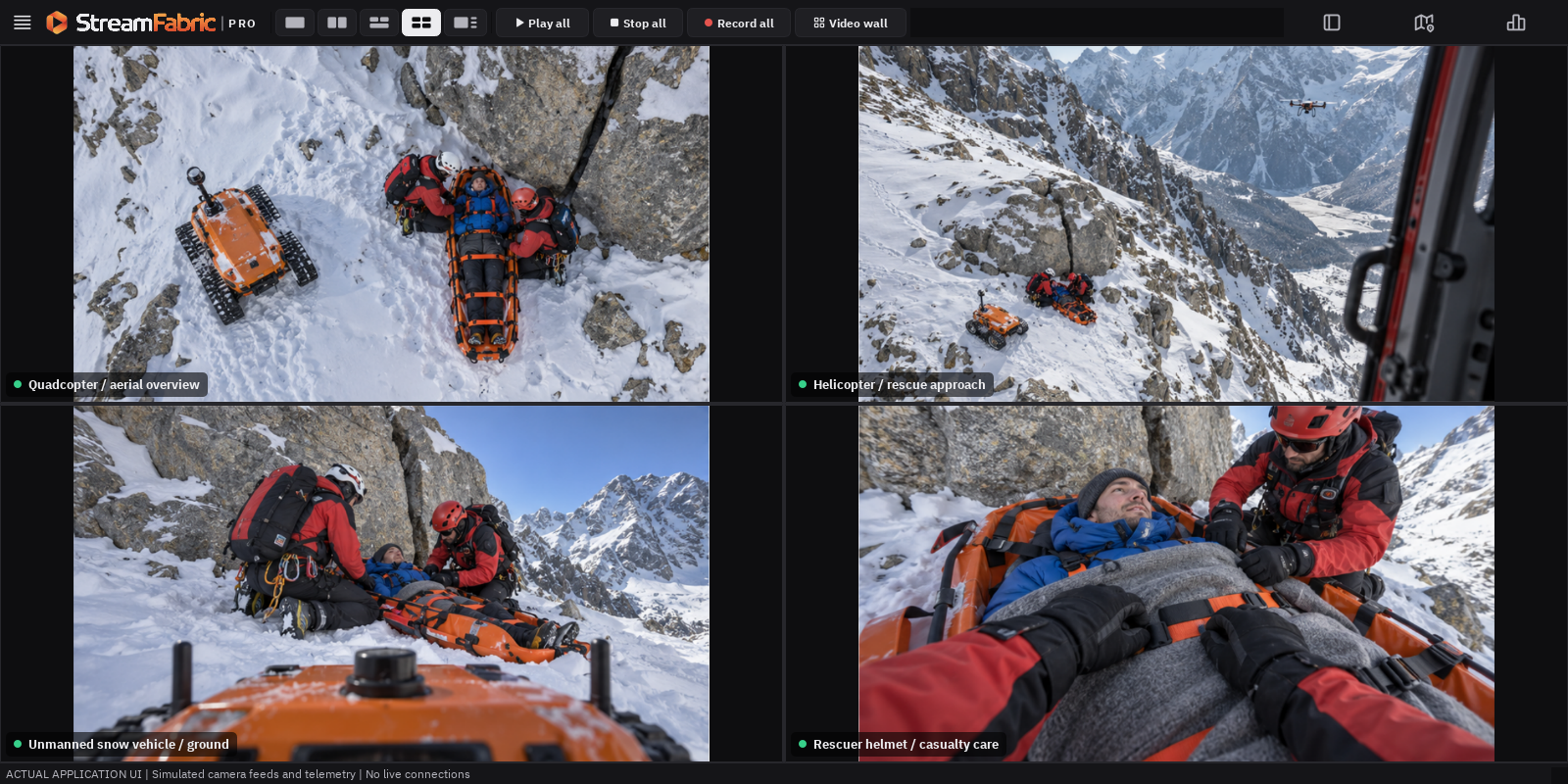
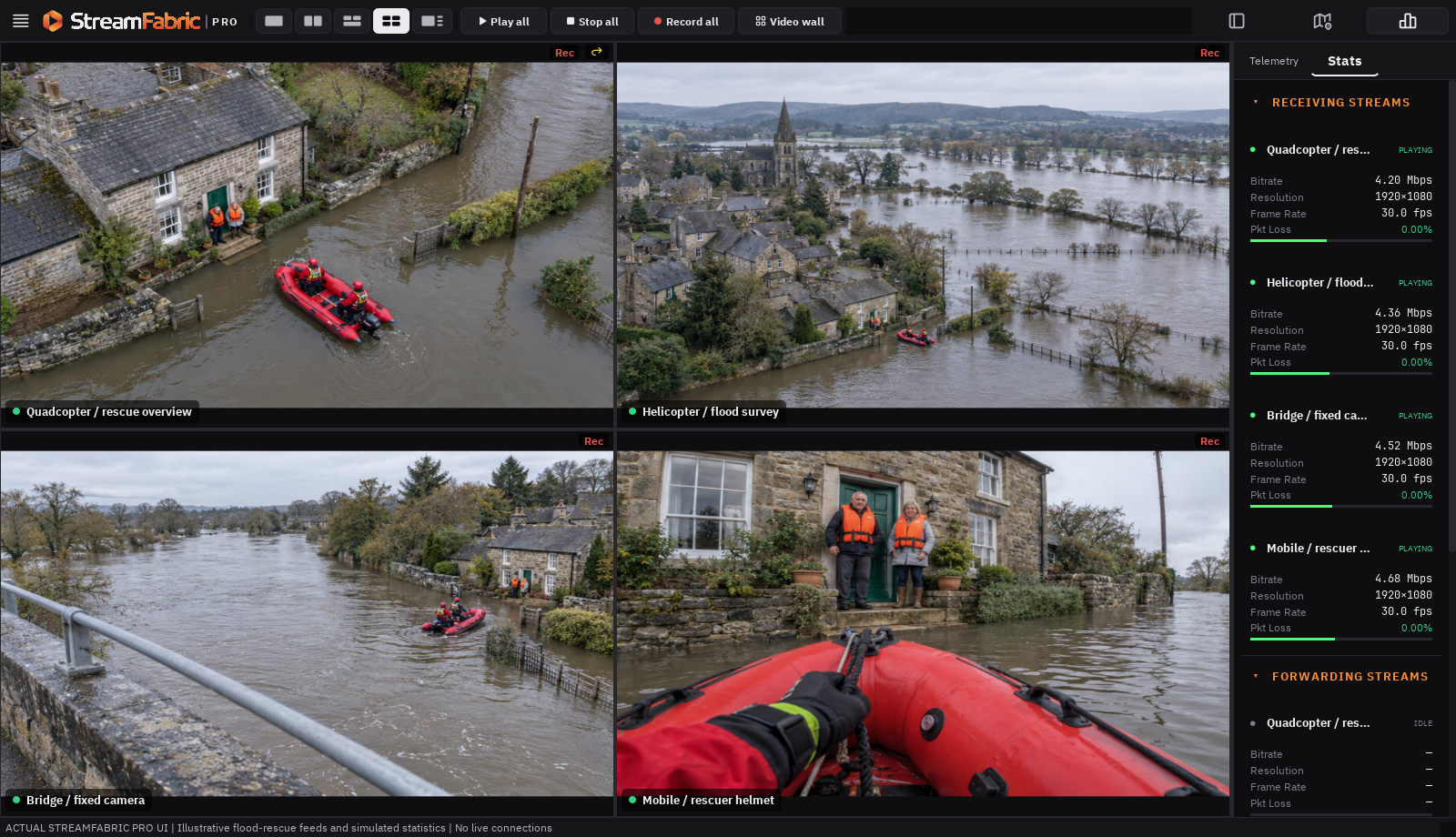
ACTUAL APPLICATION UI · STAGED FEEDS AND TELEMETRY
FOR EVERYONE WITH A VIDEO WORKFLOW
Video is only part of the picture. Personal projects. Professional operations. One connected approach to video.
For individuals and teams, commercial and non-commercial projects, civilian and defense applications. Start with the task you need to accomplish: see more, keep a record, move a feed, or understand its context.
01 / INSIDE THE WORKSPACE
One suite. Many scenarios.
Choose an example. Explore its visual story and the StreamFabric desktop workspace.
EXAMPLE 01 / 10
One rescue. Four viewpoints.
SCENARIO CONCEPTOpen image at full size ↗
A quadcopter, a helicopter, an unmanned snow vehicle and a rescuer’s helmet camera follow the same casualty rescue. In the tower, the operator sees source locations on the left monitor, all four feeds in the center, the helmet view on the right, and a large videowall ahead.
Illustrative scenario imagery.
Satellite imagery: Esri, Vantor, Earthstar Geographics, and the GIS User Community. Imagery source ↗.
Illustrative workflows with simulated feeds and telemetry. Capabilities depend on edition, device and configuration. Mobile scenarios and the eight-view composition are illustrative.
BUILT AROUND YOUR FEEDS
Monitor + Record + Forward + Understand
YOUR WORKFLOW / YOUR WORLD
Different needs. A shared view.
A first stream, a community event, a research project, or a professional monitoring desk. Explore where StreamFabric could fit your work.
PERSONAL & COMMUNITY
Big ideas can start with one feed.
Explore a camera stream, follow a club activity, or build a personal video project. Lite provides focused single-feed reception; paid desktop editions add recording, forwarding, and more views as your project grows.
The complete desktop monitoring and stream-management workspace. Start with four feeds in Pro, or choose Pro 8, 16, 32, or a configured Pro X capacity.
4–32feeds · configured custom capacity with Pro X
Receiving, forwarding, recording, and videowall
Full metadata map, overlays, statistics, and telemetry
Advanced configuration, search, and workspace controls
Advanced mobile streaming with multiview, relay, and tactical metadata integration. Includes Mobile Lite’s core capabilities, expanded for concurrent workflows within device limits.
4simultaneous panels maximum · up to 4K on compatible devices
Multiple destinations, built-in servers, and stream relay
Offline maps, KLV / CoT / JSON / NMEA, and TAK integration
Drone telemetry, MAVLink, and advanced bitrate controls
Mobile features describe planned product scope. Camera, accessory, and background capabilities depend on platform support. Panel capacity does not guarantee simultaneous maximum-resolution operation. Confirm release availability and qualified device support during your information request.
03 / CONNECT THE WORKFLOW
More context. Less switching.
Explore how video and metadata can work together across the tasks your team handles every day.
01 — MONITOR
Keep feeds in view.
Arrange desktop feeds across panels or a videowall to bring multiple viewpoints into the same workspace.
02 — UNDERSTAND
Put video in context.
Use the metadata map and stream telemetry to explore the information that accompanies your video.
03 — CONTINUE
Record. Forward. Review.
Build a desktop workflow around recording and forwarding, alongside live monitoring.
LET’S EXPLORE YOUR USE CASE
Personal projects / Commercial teams / Research & public service
THE CONNECTED SUITE
From the camera. To the bigger picture.
Bring a mobile viewpoint into StreamFabric or StreamFabric Pro. View it alongside other sources, keep its metadata in context, and forward it to the next instance in your workflow.
IN THE FIELD
ILLUSTRATED CAMERA VIEWFlood rescue / helmet camera
VIDEOLOCATION*
Phone camera · USB camera or a compatible incoming source
CONFIGURE MULTIPLE DEVICES
Mobile 01
Mobile 02
Mobile 03
Mobile 04
Lite 01
Lite 02
Example configuration: four Mobile devices + two Lite instances Each receives its own configuration file
VIDEO + METADATA*
→
A compatible stream over your configured network
AT YOUR DESK · WITH YOUR TEAM
StreamFabric / StreamFabric Pro
View togetherRecordForwardExplore metadata*
Illustrated connection workflow · Actual desktop UI with simulated feeds · Receiving-device illustrations are conceptual.*Metadata depends on the source and transport.
CAPTURE HERE. UNDERSTAND THERE.
A field camera becomes part of your desktop workspace.
Send a compatible stream from Mobile to a configured desktop receiver. Bring the phone’s view alongside other feeds in StreamFabric or Pro, then record, forward, or inspect available metadata from the same workspace.
THE CONTEXT TRAVELS TOO
The mobile development build supports video streaming over SRT, RIST, WHIP and other protocols. Metadata support and delivery vary by protocol. Available position, heading, and camera field of view can give the desktop viewer more context than the picture alone.
Use a phone as a camera source, view a compatible incoming stream, or forward that source onward. The Android development build supports these roles; capabilities vary by device and configuration.
02 / DESKTOP INSTANCE
Bring the views together.
StreamFabric brings the complete Pro desktop feature set to four feeds. Pro scales the same workspace from four to 32 feeds or configured custom capacity. Both can bring compatible mobile and other sources into the workflow.
03 / ANOTHER INSTANCE
Keep the picture moving.
Forward a compatible stream to another configured desktop or mobile receiver. Build a workflow for another desk, a field viewer, or a separate monitoring location.
What connects the instances?
Streams carry the picture. Match the sending and receiving protocol, address, port, codec, and access settings. Network reachability is required; this is not automatic cloud pairing.
Metadata carries the context. SRT, RIST, and UDP can carry supported KLV metadata with the stream. WHIP uses a separate telemetry path in the Mobile-to-Pro workflow. The available fields depend on the source.
Setup tools help prepare the link. Pro’s Configurator can use a Mobile capability report to prepare a package for the phone. Link tests help assess the connection before streaming. Package import is a setup step, not live remote control or automatic settings synchronization.
Mobile status: Android development build with documented Mobile-to-Pro interoperability. Public availability and device support are to be confirmed; iOS and iPadOS remain roadmap targets. Mobile Lite is a separate planned edition. Confirm the required combination of edition, device, protocol, and metadata when requesting information.
BEYOND THE IMAGE
Know what you’re seeing. Understand what it means.
A video frame shows the scene. Available metadata can add time, location, and source context. Stream statistics help you understand how that video is reaching you.
01 / SPATIAL CONTEXT
Put a feed on the map.
Explore available geographic metadata beside your video. Connect a viewpoint to its location for field observation, testing, research, or operational monitoring.
02 / CONNECTION CONTEXT
Look into the stream.
See receiving statistics alongside the picture. Use the reported frame rate, bitrate, and connection information to investigate your video workflow.
03 / WORKFLOW CONTEXT
Keep the next step close.
Move from live monitoring to recording or forwarding within the paid desktop workspace. Keep the source you are working with in view.
Metadata views depend on the information supplied by the source and the supported format. A map cannot infer location from video alone. Lite provides a basic single-stream map; StreamFabric and Pro editions provide full desktop metadata-map functionality.
PLAN THE DEPLOYMENT AROUND THE TASK
At your desk. Across your operation.
Explore a setup for your environment, from an individual desktop to a multi-display monitoring workstation. Match the edition, hardware, sources, and network to the job.
Personal workspace
A focused view for learning, experimenting, or following a single source.
Shared monitoring space
Explore multi-panel layouts and videowall presentation for teams and events.
Lab or integration bench
Compare incoming feeds and investigate stream statistics while testing a system.
Field workstation
Discuss source compatibility, network conditions, and metadata needs for portable or remote work.
Hardware performance, source compatibility, network access, and organizational requirements determine deployment suitability. Android Mobile is in development; Mobile Lite and additional mobile platforms are on the roadmap.
WHY STREAMFABRIC
A connected workflow. A clear way to scale.
Evaluate StreamFabric for the combination: multiple feeds, metadata context, recording, forwarding, and a choice of desktop editions and feed capacities.
VIDEO + CONTEXT
See the picture and its information.
Bring stream views, the metadata map, and receiving statistics into the same working environment.
VIEW + ACT
Keep watching. Keep working.
Arrange feeds, record, and forward in the paid desktop application, with distinct indicators for receiving, recording, and forwarding.
CAPACITY + CONSISTENCY
Choose scale with clarity.
Choose StreamFabric for the complete Pro feature set at four feeds. Pro editions scale the same desktop workspace to 4, 8, 16, or 32 feeds, with configured custom capacity through Pro X.
What sets StreamFabric Suite apart?
Bring incoming video, source context, and stream management into one connected workflow—from a field device to a desktop workspace or team videowall.
Video with operational context.
Relate supported KLV metadata to the picture through source locations, headings, and camera fields of view. Explore metadata maps, telemetry, and receiving statistics alongside your feeds to understand both the scene and the connection.
Monitor, record, and forward together.
Arrange multiple incoming sources, keep a recording, and forward compatible streams to the next receiver from the same paid desktop workspace. Source and destination controls, multiview, and videowall presentation keep the next action close to the picture.
Prepare a connected fleet.
Use Pro’s Configurator to turn one connection plan into configuration files for multiple Mobile, Lite, and Pro instances. Mobile capability reports help prepare device-appropriate settings, reducing repetitive setup and manual configuration errors.
Scale capacity. Keep the full workspace.
StreamFabric brings the complete Pro desktop feature set to up to four feeds. Larger Pro editions extend capacity to 8, 16, 32, or a configured custom count while retaining metadata maps, recording, forwarding, videowall, and advanced configuration.
Capabilities depend on edition, source, and configuration. Mobile is in development; available metadata and device performance determine supported workflows.
04 / CHOOSE YOUR CAPACITY
Choose your edition. Room to grow.
Compare all nine editions below. StreamFabric and Pro editions share the complete Pro desktop feature set, scaling from four feeds to a configured custom capacity. Mobile Lite has one panel; Mobile has up to four.
Every edition at a glance · Mobile features are planned scope
Edition
Simultaneous video panels
Primary capabilities
StreamFabric Mobile Lite
1
Mobile streaming, receiving, recording, and basic metadata
StreamFabric Mobile
Up to 4
Mobile multiview, servers, relay, offline maps, and tactical integration
StreamFabric Lite
1
Free desktop receiving and basic monitoring
StreamFabric
Up to 4
Complete Pro desktop feature set
StreamFabric Pro
Up to 4
Complete Pro desktop feature set
StreamFabric Pro 8
Up to 8
Complete Pro desktop feature set
StreamFabric Pro 16
Up to 16
Complete Pro desktop feature set
StreamFabric Pro 32
Up to 32
Complete Pro desktop feature set
StreamFabric Pro X
Custom
Complete Pro desktop feature set with configured capacity
YOUR DESKTOP EDITION
Up to 4 simultaneous feeds and panels in the main interface and metadata map, with the complete Pro desktop feature set.
Access, safety, backup, activity, and storage settings
Not part of the full Pro workspace
Included
Included
Collection and window-layout controls
Single-panel workspace
Included
Included
Play All, Stop All, and Record All
Not included
Included
Included
Desktop feed and panel capacities apply to both the main interface and metadata map. StreamFabric supports up to four; Pro supports four, with larger Pro editions at 8, 16, 32, or configured custom capacity. Pro X capacity is defined for the selected configuration, not unlimited.
Explore each desktop edition.
StreamFabric Lite+
Free desktop video receiving with essential monitoring and metadata display.
One live video feed in one video panel.
Single-stream viewing in the main interface and metadata map.
H.264, H.265, and AV1 video decoding with automatic codec detection.
UDP unicast and multicast receiving.
SRT caller, listener, and rendezvous modes with encryption support.
RIST Simple and Main profiles.
RTMP receiving and a built-in RTMP/RTMPS server.
Simplified stream setup with standard protocol controls.
Audio enable/disable control.
Embedded metadata enabled automatically.
Generic world map for basic metadata viewing.
Video overlays.
Receiving statistics and telemetry for the active stream.
Native source-quality preview by default.
Freeware.
Desktop Lite excludes recording, forwarding, videowall, multiple panels, advanced configuration, database search, and offline map-area saving.
StreamFabric+
The complete Pro desktop feature set for four simultaneous feeds.
Up to four simultaneous video feeds and four video panels.
Multiview in the main interface and metadata map.
Stream receiving, forwarding, and recording.
Videowall functionality within the edition’s feed capacity.
Full Pro metadata-map functionality.
Video overlays.
Stream statistics, telemetry, and forwarding statistics.
Source and destination management.
Advanced settings and configurator.
Database search.
Access, safety, backup, activity, and storage settings.
Collection and window-layout controls.
Play All, Stop All, and Record All controls.
StreamFabric Pro+
The complete desktop monitoring and stream-management workspace for four feeds.
Up to four simultaneous video feeds and four video panels.
Four-feed viewing in the main interface and metadata map.
Stream receiving, forwarding, and recording.
Videowall functionality.
Full metadata-map functionality and video overlays.
Stream statistics, telemetry, and forwarding statistics.
Source and destination management.
Advanced settings, configurator, and database search.
Access, safety, backup, activity, and storage settings.
Collection and window-layout controls.
Play All, Stop All, and Record All controls.
StreamFabric Pro 8+
The full Pro feature set with capacity for eight simultaneous feeds.
Up to eight simultaneous video feeds and eight video panels.
Eight-feed viewing in the main interface and metadata map.
All StreamFabric Pro capabilities.
Stream receiving, forwarding, and recording.
Videowall, metadata maps, overlays, statistics, and telemetry.
Full configuration, search, source, destination, and workspace controls.
StreamFabric Pro 16+
The full Pro feature set with capacity for sixteen simultaneous feeds.
Up to sixteen simultaneous video feeds and sixteen video panels.
Sixteen-feed viewing in the main interface and metadata map.
All StreamFabric Pro capabilities.
Stream receiving, forwarding, and recording.
Videowall, metadata maps, overlays, statistics, and telemetry.
Full configuration, search, source, destination, and workspace controls.
StreamFabric Pro 32+
The full Pro feature set with capacity for thirty-two simultaneous feeds.
Up to thirty-two simultaneous video feeds and thirty-two video panels.
Thirty-two-feed viewing in the main interface and metadata map.
All StreamFabric Pro capabilities.
Stream receiving, forwarding, and recording.
Videowall, metadata maps, overlays, statistics, and telemetry.
Full configuration, search, source, destination, and workspace controls.
StreamFabric Pro X+
The full Pro feature set with a custom feed capacity for your deployment.
Custom simultaneous video-feed and panel capacity.
Configured capacity available in the main interface and metadata map.
All StreamFabric Pro capabilities.
Stream receiving, forwarding, and recording.
Videowall, metadata maps, overlays, statistics, and telemetry.
Full configuration, search, source, destination, and workspace controls.
Feed capacity defined for the selected configuration; not unlimited.
MOBILE / PLANNED CAPABILITIES
Take your workspace into the field.
Essential streaming, viewing, and recording with Mobile Lite. Advanced multiview, relay, and tactical metadata integration with Mobile.
Mobile features describe planned product scope for Android, iOS, and iPadOS. Confirm release availability and qualified device support during your information request.
Mobile capabilities at a glance · planned scope
Capability
Mobile Lite
Mobile
Simultaneous video panels
1
Up to 4
Maximum video quality
1080p at 30 FPS
Up to 4K on compatible devices
Workflows
Transmit one stream to one destination or receive one stream at a time
Concurrent streaming, receiving, recording, and forwarding within device limits
Recording
While streaming and received video
Local and received-stream recording, within device limits
Servers, relay, and destinations
One destination; no relay or built-in servers
RTMP/RTMPS, RTSP/RTSPS, and WHIP ingest servers; relay and multiple destinations
Maps and metadata
Basic positions, KLV display and compatible recording preservation
Offline maps; position, bearing, field of view; KLV generation, recording, and forwarding
Tactical and drone integration
Core streaming and basic metadata
CoT broadcasting, TAK connectivity, ATAK / WinTAK video, drone telemetry, and MAVLink
Adaptive bitrate
Supported streaming workflows
Advanced controls; 256 kbit/s narrow-link target, best effort below
Four video panels does not mean four simultaneous 4K streams. Performance depends on hardware, resolution, codecs, network conditions, and active workflows. Mobile camera, accessory, and background capabilities depend on platform support. Panel capacity does not guarantee simultaneous maximum-resolution operation.
StreamFabric Mobile Lite+
Essential streaming, viewing, and recording for phones and tablets.
Android, iOS, and iPadOS.
One video panel for camera preview or live stream viewing.
Transmit one stream to one destination or receive one stream at a time.
Video quality up to 1080p at 30 FPS.
H.264 and H.265 video support, with AV1 playback on compatible devices.
AAC and Opus audio, plus G.711 for compatible incoming streams.
SRT, RTMP, RTMPS, UDP unicast, and UDP multicast streaming and receiving.
RTSP and RTSPS receiving.
Front and rear camera capture with live camera switching.
Device screen streaming.
Local recording while streaming and recording of received video.
Photo capture and flashlight control during camera streaming.
Adjustable bitrate, resolution, and frame rate.
Adaptive bitrate for supported streaming workflows.
GPS, timestamp, and text overlays.
Basic map with device and received stream positions.
Basic KLV metadata display and preservation in compatible recordings.
Automatic network interface detection.
Supported authentication, encryption, and explicitly trusted self-signed certificates.
Background operation where supported by the platform and source.
StreamFabric Mobile+
Advanced mobile streaming with multiview, relay, and tactical metadata integration.
Includes Mobile Lite’s core capabilities, expanded with:
A personal project or a professional deployment: tell us what you need to see, record, forward, or understand. We’ll help you explore the right capabilities for your workflow.
INFORMATION FOR YOUR WORKFLOW
Your feed count. Your operating environment. Your questions.